


What is Cumulative Layout Shift (CLS)?
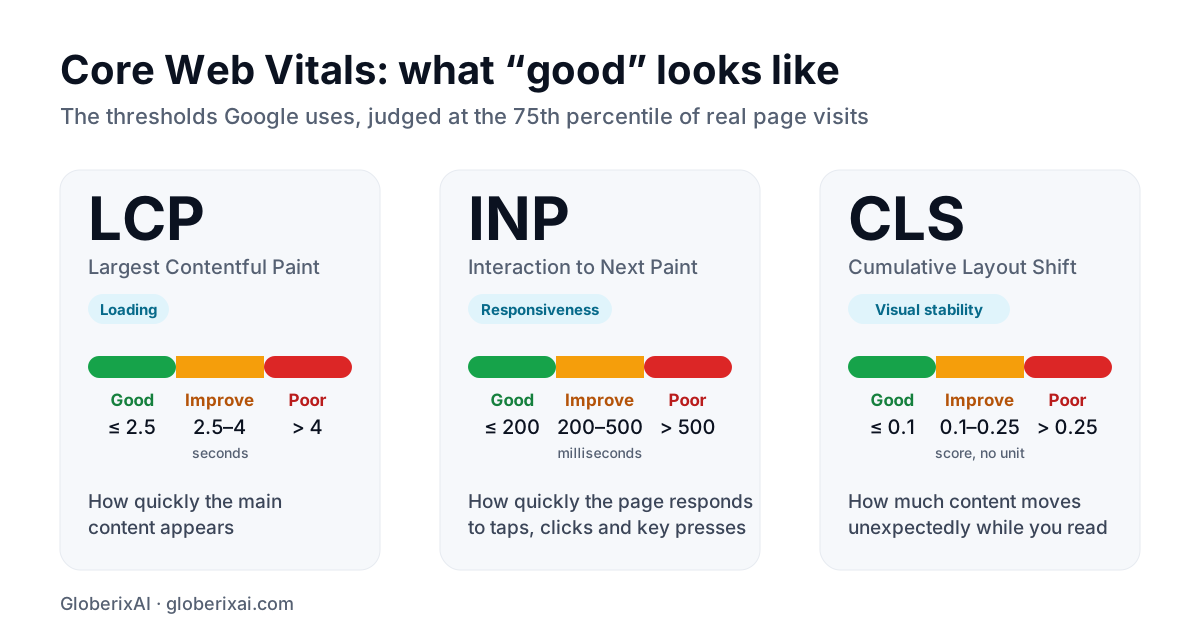
Cumulative Layout Shift (CLS) is a Core Web Vital that measures how much visible content moves unexpectedly while a page loads or is used. Google treats a CLS of 0.1 or less as good, 0.1 to 0.25 as needing improvement and more than 0.25 as poor, judged at the 75th percentile of real visits. Common causes are images without dimensions, late ads or embeds, web fonts and content inserted above what you are reading.
CLS at a glance
| CLS score | Rating | What users experience |
|---|---|---|
| 0.1 or less | Good | The page feels stable |
| 0.1 to 0.25 | Needs improvement | Occasional jumps that can cause mis-taps |
| More than 0.25 | Poor | Content moves enough to frustrate or mislead |
How CLS is calculated
Every time a visible element changes position without the user asking for it, the browser records a layout shift. Its score is the share of the viewport affected (the impact fraction) multiplied by how far the element moved (the distance fraction).
Shifts that happen in quick succession are grouped into session windows, and the page's CLS is the worst window. Shifts that occur within a moment of a tap or click are not counted, because the user expected something to change.
The most common causes of layout shift
- Images, video and iframes without width and height, so the browser cannot reserve space.
- Ads, embeds, cookie banners and widgets that load late and push content down.
- Web fonts that swap in with different letter sizes, so text reflows.
- Content injected above what the visitor is already reading.
- Animations that change top, left or height instead of using transforms.
- Components that appear only after JavaScript loads, with no placeholder.
How to fix CLS, step by step
- Find the shifting elements: PageSpeed Insights lists them, and Chrome DevTools can highlight layout shifts as they happen.
- Give every image, video and iframe width and height attributes, or set a CSS aspect-ratio.
- Reserve space for ads, embeds and banners with a minimum height, or overlay them instead of pushing content.
- Load fonts with a close fallback font and preload the important one, so the swap barely moves text.
- Add skeleton placeholders with fixed dimensions for content that loads later.
- Animate with transform and opacity, which do not move surrounding content.
- Never insert new content above existing content unless the user asked for it.
Key takeaway: If you fix only one thing, set dimensions on every image and embed. It removes the most common cause of poor CLS.
Fixing CLS in React and Next.js
Frameworks help but do not guarantee a stable layout. In Next.js, the Image component requires dimensions and the font module reduces font shifts. Watch for banners or personalised blocks that render only after hydration, and give them a reserved container so the page does not jump when they appear.
How to measure CLS
Lab tests often miss shifts that happen later in a visit, such as after scrolling, so a page can look fine in Lighthouse and still show poor CLS in field data.
- Search Console and PageSpeed Insights show field data from real visitors.
- Lighthouse and DevTools help you reproduce and diagnose shifts in a lab.
- The web-vitals JavaScript library records CLS from your own visitors.
Keep going
CLS is one of three metrics. Read the full Core Web Vitals guide, then see how to improve LCP and INP. Our web development team builds sites to pass all three.
Frequently asked questions
What is a good CLS score?
0.1 or less at the 75th percentile of real visits. Between 0.1 and 0.25 needs improvement, and above 0.25 is poor.
Why is my CLS high in field data but fine in Lighthouse?
Lighthouse measures a single page load in a lab. Real visitors scroll, interact and see late content, so shifts that happen later in a visit show only in field data.
Does CLS affect SEO?
It is part of Google's page experience signals, so it can help, but content relevance matters far more. A stable page also converts better.
Can CLS be zero?
Yes. A page whose elements all have reserved space and never move unexpectedly can score 0.